
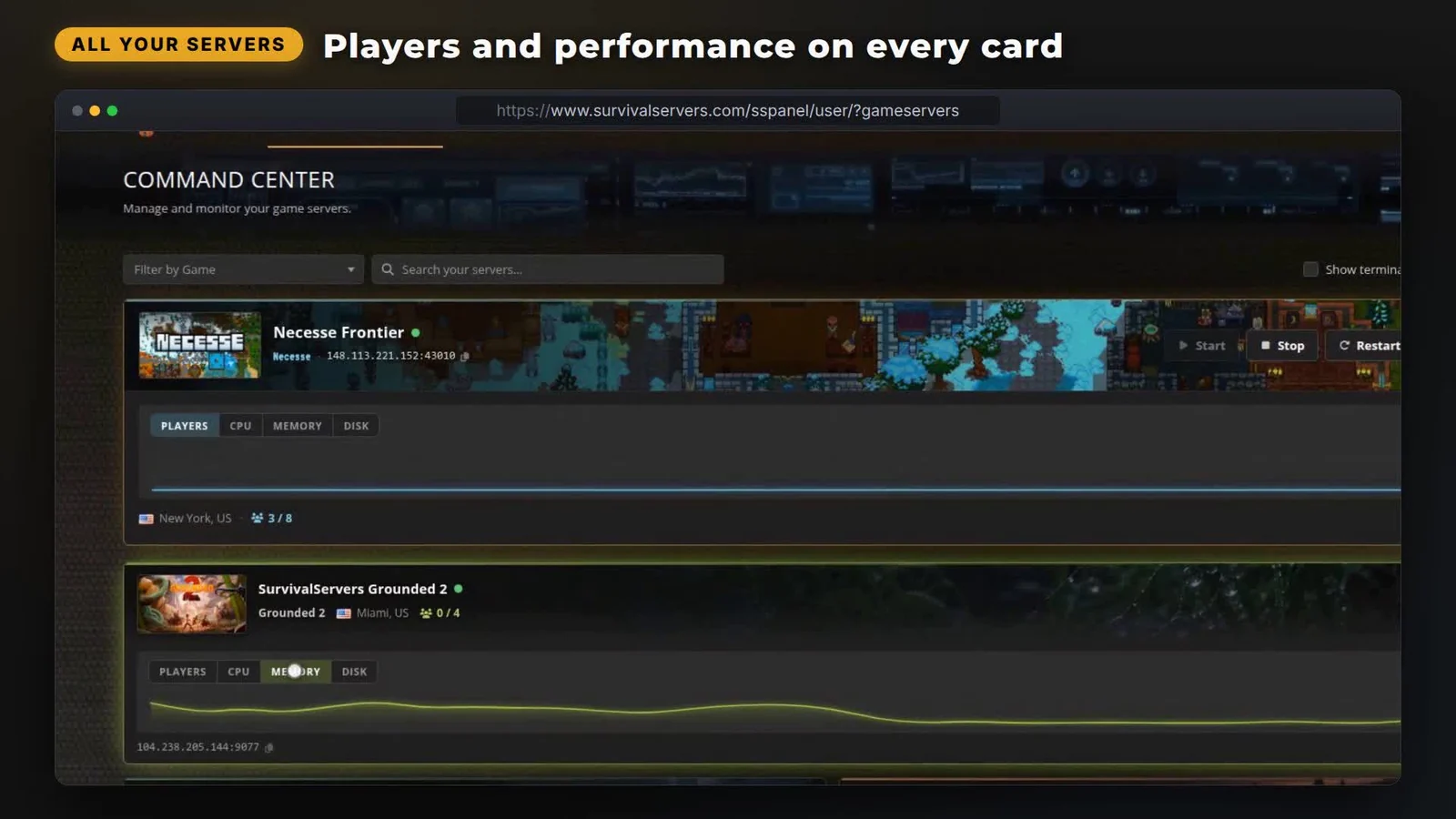
Nearly everything you do in a hosting panel happens on two pages: the list of your servers, and the page for one server. So when we rebuilt our control panel, that is where almost all of the work went. The rebuild became the default on every Survival Servers account on August 17, 2026, with nothing migrated and nothing to switch on.
The next time you sign in you are already on it. Here is what actually changed for someone running servers, the reasoning behind the calls we made, and how to go back if you would rather not. Everything below is live right now at your control panel, and both of the pages it describes now keep themselves up to date while you watch.
Your server list is a set of cards, and the cards move
Drag your servers into whatever order matches how you think about them. Then pin the one that matters most to the top. Order, pin and card size are saved to your account, not to the browser, so the arrangement follows you to whatever machine you sign in from next. A Reset Layout button puts it back when you want the default again.
Only the pinned card carries start, stop and restart buttons, and each one asks before it fires. That was deliberate. Power controls on every card in a list of twelve is a mis-click waiting to happen. They live on the single server you told us you care about.
Status dots on the visible cards refresh by themselves, so the page stops claiming a server is down after it has come back up. The File Manager also opens straight from a card now, without going through the server page first. The File Manager itself is unchanged. What is new is that it sits one click from the list.
Players, CPU, memory and disk on the card
The pinned card carries a real chart with a Players, CPU, Memory and Disk switcher above it. The compact cards below it carry a small players strip instead. It works this way fleet-wide, on every game we host, not just on a showcase title.
It is also honest about having no data. A chart needs a few polls inside the last seven days. A server stopped for a week draws no chart area at all, rather than a flat line pretending to be information. That is why an idle test server looks bare and a busy one does not.
We measured the coverage across the whole fleet this week rather than guessing at it. Of the Palworld servers genuinely running on a host, 3,346 out of 3,353 had a chart. So did all 63 running Windrose servers, and 139 of 149 Valheim servers. The remainder is almost entirely servers nobody has started recently.
Passwords are masked, and everything copies
The old panel printed your FTP password into the page text. A screenshot or a shared screen leaked it without anyone noticing. The new page masks it behind an eye, and it puts a copy button on the address, the FTP host, the user and the password. On a game with RCON, those credentials get the same treatment.

This is the server page only. List cards copy the server address and nothing else, so an FTP password still means opening the server you want.
The launch line is written for you now
Launch parameters were the worst thing in the old panel. The ARK page was 44 raw inputs with a disconnected text box underneath. Get one of them subtly wrong and the server started, then behaved oddly for a week.
The builder replaces the raw fields with plain English: PvE mode tells you it stops players damaging each other, and taming speed tells you that 5 means taming finishes five times faster. Meanwhile the assembled command line sits at the top of the window and rewrites itself as you change things, so you can read what your server will be started with before you save.
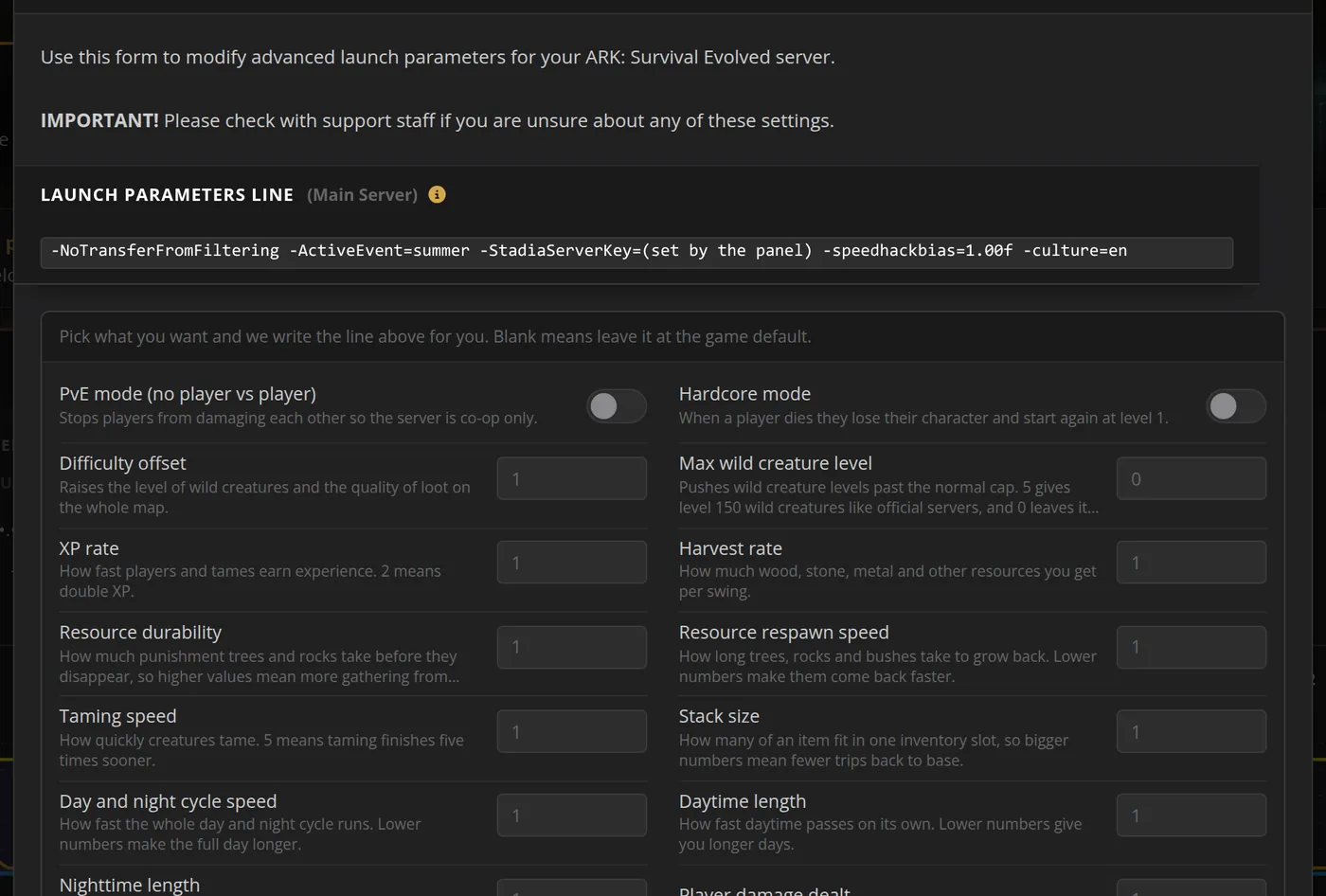
Six games have the friendly controls today: Palworld, ARK, Valheim, Minecraft, Rust and Satisfactory. The live preview of the assembled line covers ten games.
Every game that had a custom launch-line field still has it, now inside the same window. To see what those flags do underneath, Pocketpair publishes its own Palworld server guide.
Every tool in one labeled row
Tools used to live in three different places on a server page. There was a list in the top card, a row inside the settings form, and loose buttons under the FTP details. Now they share one row with a caption on each tile.

An ARK server shows seven tiles: Game.ini, GameUserSettings.ini, Server Config, Launch Params, Custom Restarts, Add Cluster and File Manager. A simpler game shows three. Either way it is the same row in the same place on every game we host.
Some smaller things arrived alongside it:
- Every dropdown is searchable, which matters on ARK where one page carries a few hundred of them.
- Unsaved changes dock a save bar that follows you down the settings form.
- Browser alert boxes are gone, replaced by toasts that do not block the page.
- Invoices and orders are sortable, searchable tables with a filter for unpaid invoices.
If you want the old panel back
Add ?panelview=classic to any panel URL and you are on the old one for the next thirty days. The View classic panel link inside the panel does the same thing. Classic is not going anywhere yet, and our support team uses the same switch when somebody asks for it.
Worth saying plainly: nothing moved out of reach. The pages are shorter than they were. On a phone the start and stop controls now sit near the top of the screen, where they used to sit below a welcome banner and a menu accordion.
Everything classic could do, the new panel does.
What this means for your servers
Nothing you configured changed. Same servers, same settings, same files, same FTP credentials, and the same tools at different places on the page. If a scheduled restart or a config value was right last week, it is still right this week.
Two things are worth five minutes. The pin and the drag order decide what you look at every time you open the panel. The launch builder is the other, if you run one of the six games that has it.
The control panel guide in our wiki walks the page section by section, and the file manager guide covers the file side. If you are not hosting with us yet, the games we host is the full list.
 Written by , CEO at Survival Servers
Staff ← All news
Written by , CEO at Survival Servers
Staff ← All news

 RuneScape: Dragonwilds
 Valheim
 Hytale
Comments
No comments yet. If you run one of these servers, what did you hit?