

Stardew Valley Server Hosting
Our Stardew Valley server hosting plans come with the features you need
Your game server will come with the following, instantly available features:


Access to our custom Game Server Management Panel
The in-house Survival Servers game control panel allows you to configure and customize your Stardew Valley co-op server. Browse and install SMAPI mods with the built-in mod manager, switch locations, update files, and manage your farm with our easy one click form. Survival Servers is a Stardew Valley server hosting provider with our custom panel. From there, join your Stardew Valley server and play with your friends!


Powered by Pelican
Pelican is the server software behind every Survival Servers Stardew Valley farm. It adds a live farm map and a browser console to your control panel.
Pelican is our own server software for hosting Stardew Valley and is not affiliated with or endorsed by ConcernedApe. It runs on the server only — your friends still join with a completely vanilla game.
-
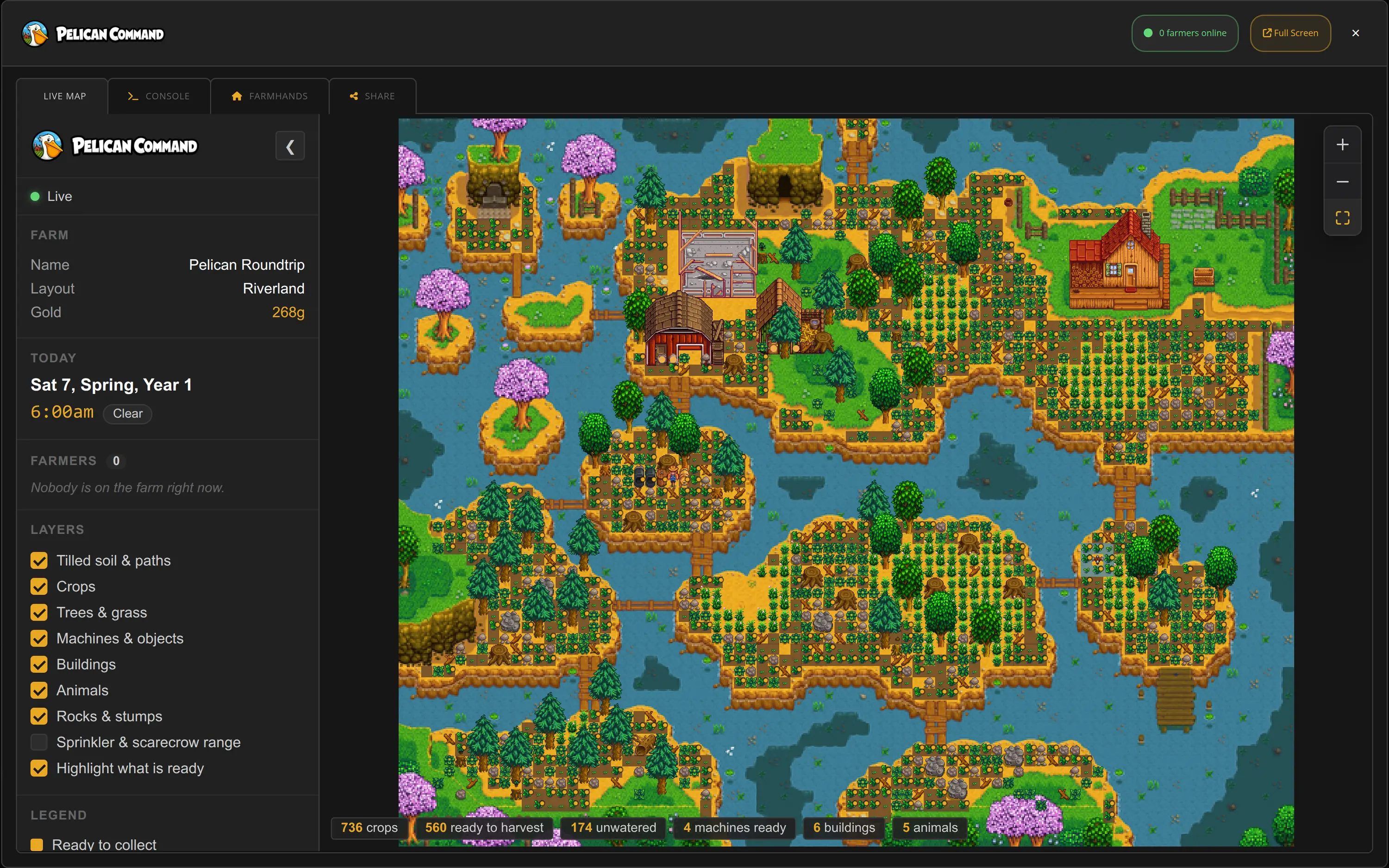 Live Farm Map Your farm drawn from the running server in the game's own art — buildings, crops, machines, trees, grass and stones — with animals and every farmer's live position marked, plus layers you can switch on and off.
 -
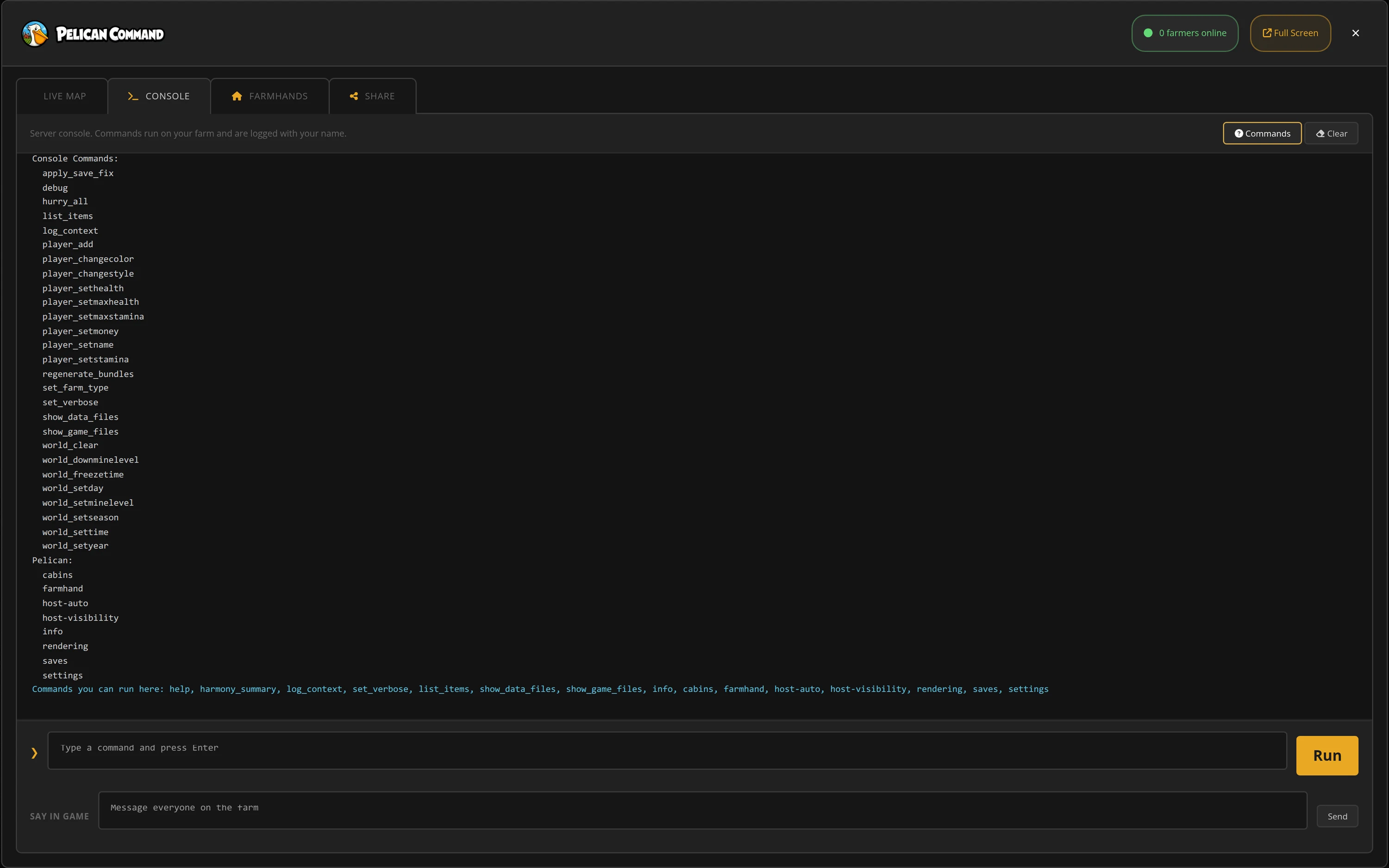 Browser Console Watch the live server log, run the server commands we allow on your farm, and send a message to everyone playing — all from the control panel, with nothing to install.
 -
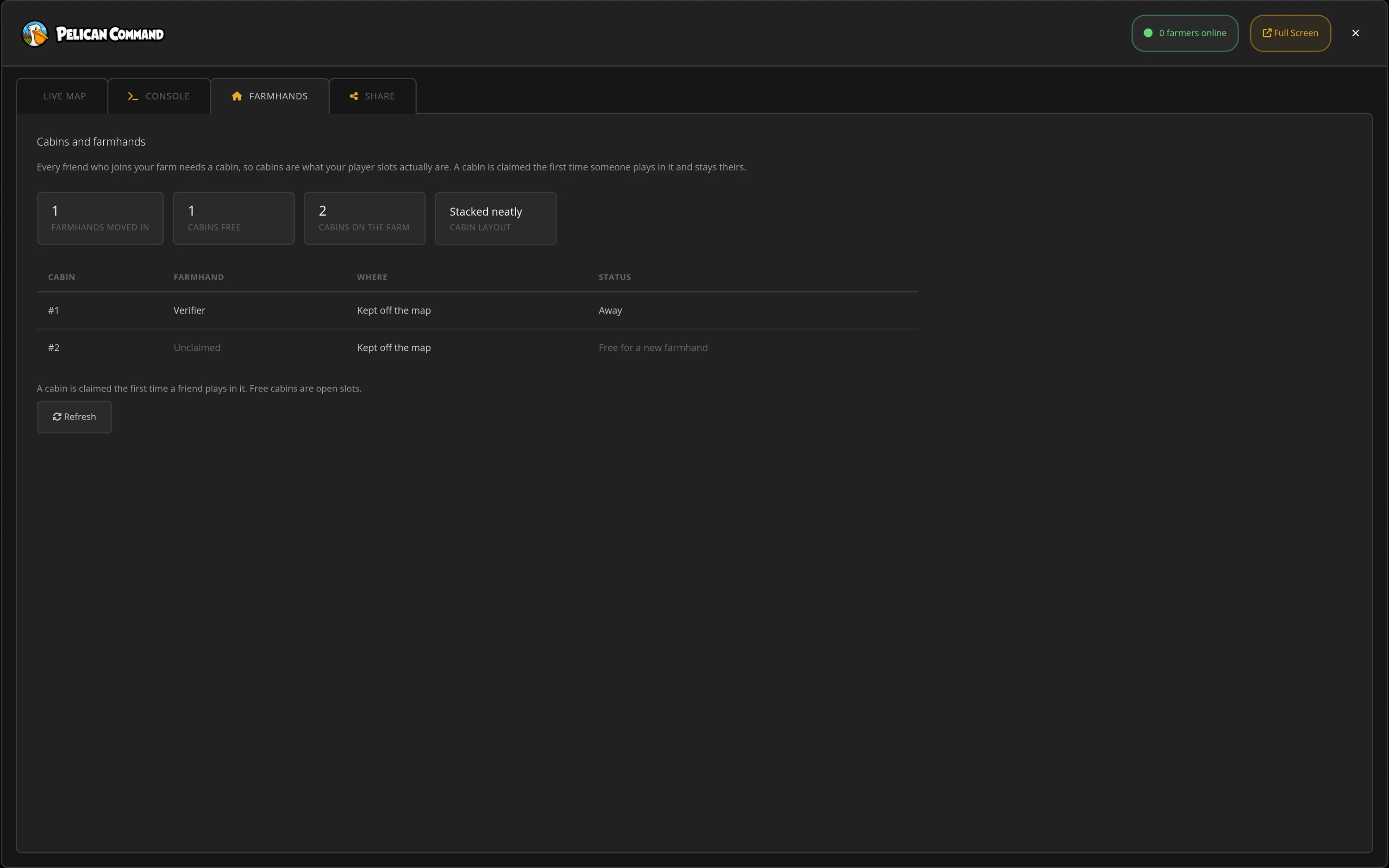 Cabins & Farmhands Cabins are your player slots: see every cabin on the farm, who has moved in, who is on the farm right now, and how many spots are still free for new farmhands.
 -
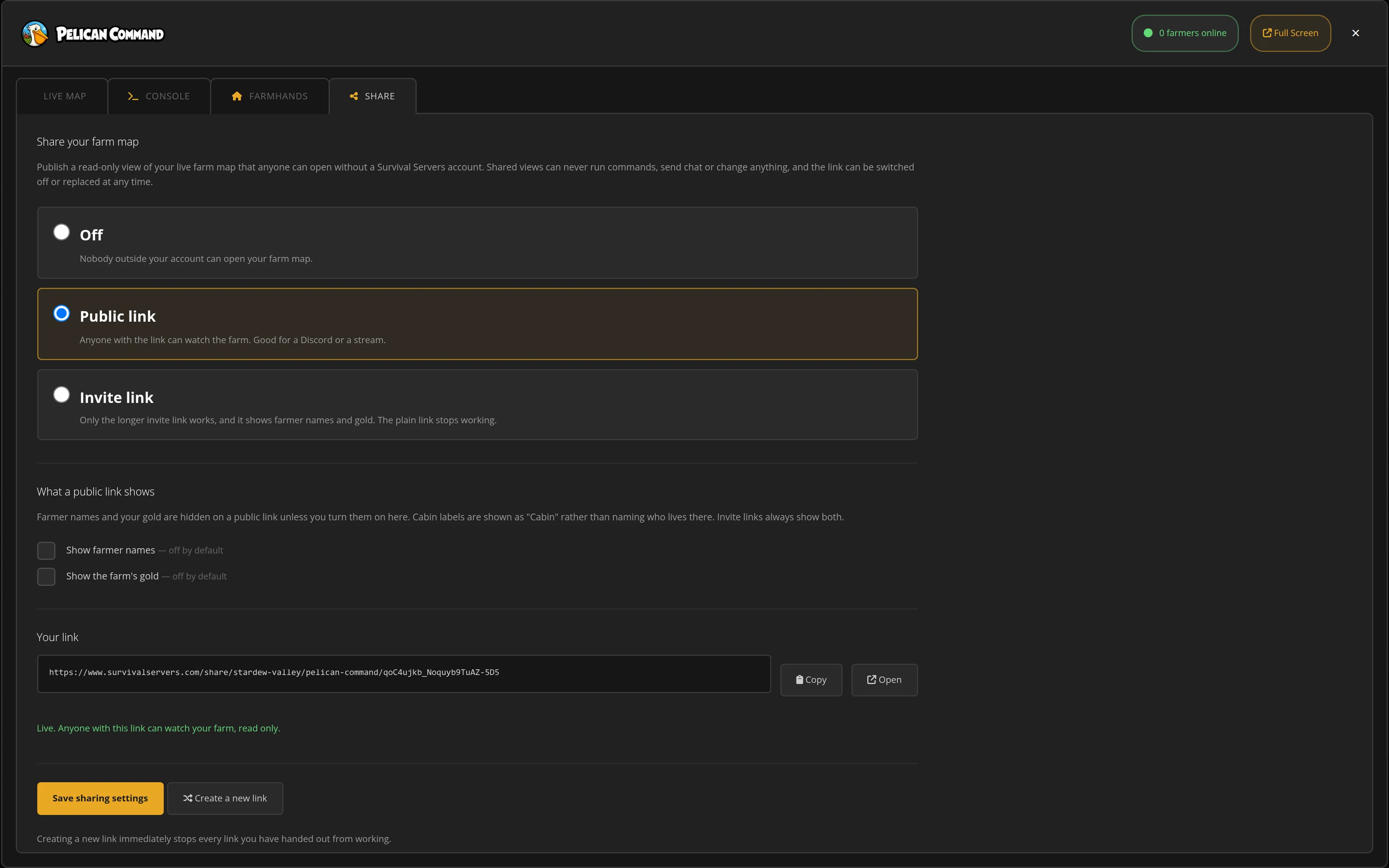 Share Your Farm Publish a read-only live map anyone can watch without a Survival Servers account — a public link for your Discord or stream, or an invite link just for your group — and switch it off or replace it at any time. Farmer names and gold stay hidden on a public link unless you turn them on.
Live Farm Map
Your whole farm, live, with buildings, crops, machines, trees, rocks and farmer positions.
Browser Console
Live server log, an allowed command list, and two-way chat with everyone on the farm.
Crops At A Glance
Growth stage, what still needs water, what is ready, and the tiles your sprinklers and scarecrows cover.
Pre-Installed & Panel-Integrated
Included with every Stardew Valley server, kept up to date, with Pelican Command right in the control panel.
Global Network, Multiple Hosting Locations
Switch locations any time. DDoS protection available.
What is Stardew Valley?
Stardew Valley is a farming and life sim RPG where players restore a farm, grow crops, raise animals, mine, fish, build relationships, and explore Pelican Town. Multiplayer co-op lets friends work the same farm together, share progress, and keep the world moving across sessions.
How to Create a Stardew Valley Server — Stardew Valley Server Setup Guide
This free Stardew Valley server setup guide walks you through creating a dedicated Stardew Valley co-op server the fast way (with SurvivalServers) and the DIY way (self-hosted on your own hardware).
Hosting your Stardew Valley server with us is effortless:
- Click Order Now above
- Enter a Username, Password and Email Address or sign up with Google/Twitch
- Select your slot amount, datacenter, and billing cycle
- Click "Order Now" and your Stardew Valley server is provisioned automatically, online in minutes with full control panel access — share the server address and your friends join from the normal co-op menu, no mods or launcher needed
Without SurvivalServers
Stardew Valley has no official dedicated server tool — vanilla co-op only exists while the host player is in the game. Keeping a farm online around the clock yourself takes real setup:
System Requirements
- A spare PC or rented machine that stays on 24/7, with its own copy of Stardew Valley for the server — the "server" is a full copy of the game running as the host player
- SMAPI (the Stardew Modding API) plus a community host-automation mod that plays the host for you: going to bed at night, handling festivals, and pausing time when the farm is empty
- A stable connection with the Stardew Valley port forwarded (default
24642UDP) and a matching firewall rule - The game renders normally even as a server, so it wants a real desktop session rather than a bare headless box
Installation
- Install Stardew Valley and SMAPI on the always-on machine, then add a host-automation server mod and configure it.
- Create the multiplayer farm: from the title screen choose Co-Op, then the Host tab, then Host New Farm — and add one cabin for every player who will join. Each farmhand needs a cabin, and options like profit margin are locked in at farm creation.
- Forward UDP
24642to the host machine and share your public IP and port — friends join from Co-Op → Join LAN Game. - Saves are written only at the end of each in-game day and live under
%AppData%\StardewValley\Saves. Back that folder up yourself on a schedule. - Every game update is a coordination job: the host's game version, SMAPI, and mods must stay in step with every player's client.
Mods
- The control panel's mod manager browses the CurseForge catalog and installs mods in one click; the server downloads and verifies them automatically on restart. Manual uploads to the Mods folder still work too.
- Badges on every mod say who needs what: server-side mods work for everyone with a vanilla game, while content mods must also be installed by each joining player. The panel flags available updates and mods marked broken.
Why Wait? Use SurvivalServers Instead
- Instant provisioning on enterprise NVMe SSD hardware with DDoS protection across 8 global datacenters
- Your farm stays online 24/7 — time pauses automatically when nobody is on, and the day's progress saves when everyone heads to bed
- Automated restarts, backups, and full FTP and File Manager access to your saves and mods on day one
- Friends join with a completely vanilla game — no port forwarding, no firewall rules, no host PC left running in a spare room
Stardew Valley Dedicated Server vs In-Game Co-op
Stardew Valley co-op supports up to 8 players — but in vanilla multiplayer the farm only exists while the host is playing. Everyone's progress lives on one player's PC, and the whole group plays on the host's schedule. A dedicated server keeps your farm online 24/7, so anyone can log in to water the crops, check the animals, or dive into the mines on their own time.
Stardew Valley Settings, Saves and Crossplay
Configuration
Stardew Valley locks its big multiplayer choices in at farm creation — farm type, starting cabins, profit margin, shared or separate wallets — so it pays to set the farm up right the first time. Our server configuration guide covers what is decided when, and your files and saves stay fully accessible over FTP and the File Manager.
Admin & Commands
Multiplayer has built-in chat commands for messaging, emotes, and host powers like kicks and bans — see our admin commands guide. On a hosted farm, player management runs from the control panel.
Crossplay
Stardew Valley multiplayer is crossplay across the whole PC ecosystem: Steam and GOG copies play together, and Windows, Mac, and Linux all share the same farm. Console versions are platform-locked and cannot join a PC farm.
Sizing & Saves
Stardew Valley is one of the lightest games to host. Strong single-thread CPU speed and NVMe storage keep sprawling end-game farms full of sprinklers and machines running smooth, and the world saves at the end of each in-game day, when everyone is in bed.
Why Host Your Stardew Valley Server With Us?
Pelican Pre-Installed
Live farm map and browser console, kept up to date and built into the panel. No setup, and your friends still join with a vanilla game.
The Farm Set Up Right
Farm type, cabins, profit margin and shared or separate wallets are all chosen when the farm is created, so the choices Stardew locks in are made before your first day.
SMAPI Mods Your Way
Browse thousands of SMAPI mods in the control panel and install them in one click, with badges that say which mods joining players also need. Nexus-only mods upload through the File Manager and are managed the same way.
Sized For Long Farms
Fast single-thread Intel/AMD CPUs on NVMe keep a late-game farm of sprinklers and machines smooth, with automated restarts and one-click backups of your saves.
From the SurvivalServers Wiki
Stardew Valley Guides & Tutorials
Frequently Asked Questions about Stardew Valley Server Hosting
Stardew Valley does not ship an official standalone dedicated server. Survival Servers runs your farm as an always-on host on our hardware, so friends can join and play any time without anyone's PC staying open. Players connect from the normal co-op menu with a completely vanilla game.
From the title screen choose Co-Op, pick the Join tab, then Join LAN Game, and enter the server address. No mods, launcher, or extra software is needed to join a vanilla farm, and the first visit creates your farmhand character.
Yes, within the PC ecosystem: Steam and GOG copies of Stardew Valley play together, and Windows, Mac, and Linux all share the same farm. Console versions (PlayStation, Xbox, Switch) are platform-locked and cannot join a PC farm, and mobile multiplayer is an experimental feature.
Stardew Valley co-op is built around cabins, with one cabin per farmhand and support for up to 8 players in the base game. Our plans start at 4 slots and scale up from there, with the server handling cabins as friends join.
Yes. Every Stardew Valley server here runs Pelican, our own server software, which adds Pelican Command to the control panel. Its live map draws your farm straight from the running server, with buildings, crops and their growth and watering state, machines, trees, animals and where each farmer is standing, and its browser console streams the live server log, runs the server commands we allow, and sends chat to everyone playing. Nothing is installed on your players' computers.
Yes. Pelican Command's Share tab publishes a read-only view of your live farm map at a private link that opens in any browser, no Survival Servers account needed. Shared views can never run commands or change anything, farmer names and gold stay hidden unless you turn them on, and you can switch the link off or replace it at any time.
Yes. The control panel includes a built-in SMAPI mod manager: browse thousands of mods, install them in one click, and the server downloads and verifies them automatically on the next restart. Badges show which mods joining players also need, and the panel flags available updates and mods marked broken. Nexus-only mods can be uploaded through the File Manager and are managed the same way.
Stardew Valley is a farming, life sim, and RPG. Players manage a farm, gather resources, craft, fish, mine, complete quests, and build relationships with villagers while progressing through seasons and events.
Stardew Valley released for PC on February 26, 2016 and has continued receiving major free updates since launch.