
Terraria 1.4.6 came out on Nov 24 on PC, consoles and phones. It's the first version where Xbox, PlayStation, iPhone and Android players can join a dedicated server, the kind we host. Re-Logic calls it Crossplay Phase One.
Most of Phase One is for players on the same Wi-Fi, who see each other's worlds with no subscription. For servers, the change is that consoles and phones can add one by its address.
Who can join a Terraria server
- PC: yes.
- Xbox: yes, with Xbox Game Pass Essential or higher.
- PlayStation: yes, with PlayStation Plus.
- iPhone and Android: yes, with nothing extra.
- Nintendo Switch: no. Nintendo doesn't let Switch join privately hosted servers, so Switch players only join worlds other players host.
Xbox and PlayStation need the subscription because the connection runs through Microsoft's and Sony's online services. The Chinese mobile versions use a different multiplayer system and can't join either.
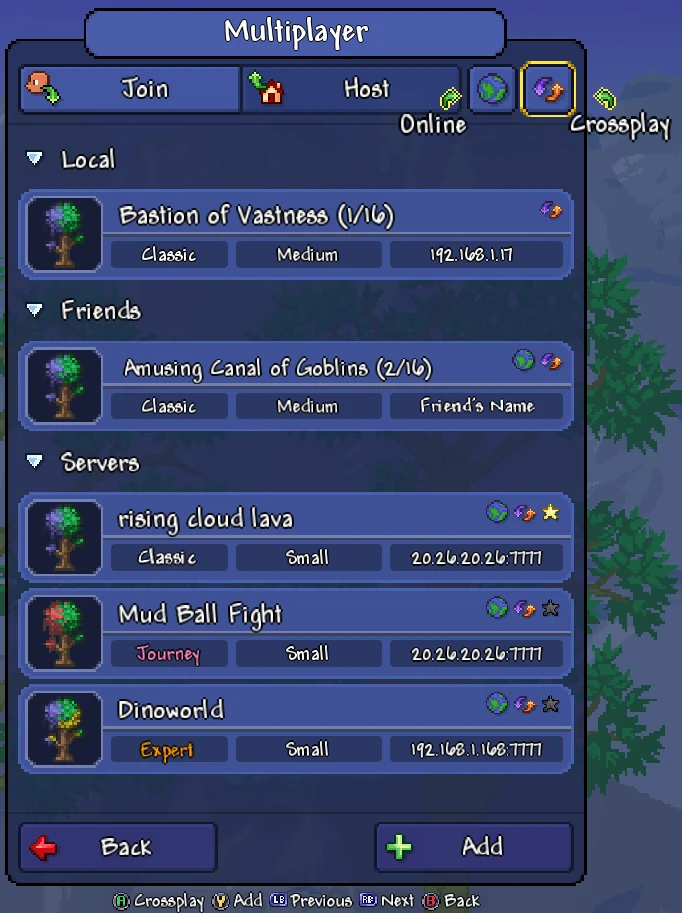
The Multiplayer menu on consoles and phones. Online and Crossplay sit at the top right. Image: Re-Logic
How players join your server
Each player adds your server once: Multiplayer, then Add Server on PC or Add on consoles and phones. The IP address goes where it says Enter the IP address or URL, and the port where it says Enter the port. The game keeps the server under Servers after that.
Every Terraria server we host has its own port, not Terraria's usual 7777, so players need to type the port too. Both numbers are next to Address on your server's page in the Command Center.
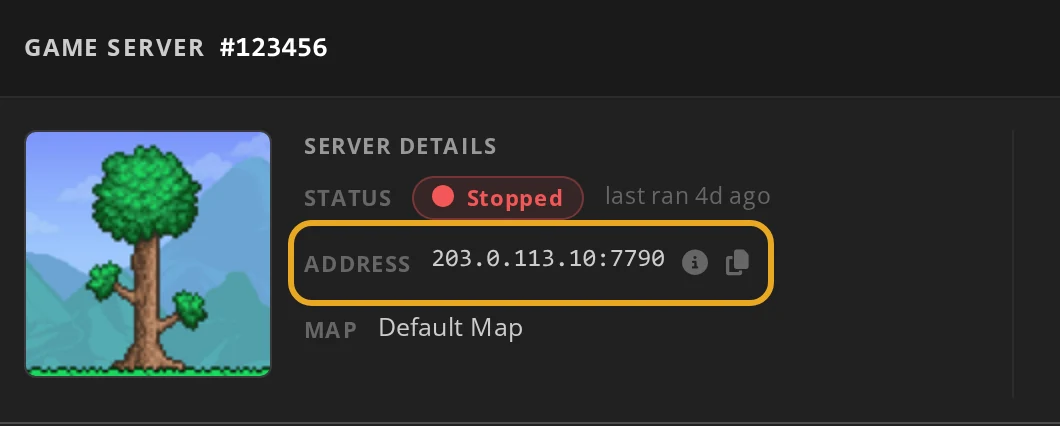
Your server's IP address and port, next to Address.
On Xbox, Crossplay can start off. It's the button to the right of the globe at the top of the Multiplayer menu. The steps for each platform are in our guide, How to Join a Terraria Server on Xbox, PlayStation and Mobile.
Update your server to 1.4.6 first
A Terraria server only lets in players on its own version. One still on 1.4.5.8 turns 1.4.6 players away with "You are not using the same version as this server."
If Server Update (Automatic) is on, your server takes 1.4.6 at its next start or restart. If it's off, set Server Update to Yes, run update and click Save Settings & Restart. Leave Server Version on Latest, because a version number there keeps the server on that version.

Server Update is under Modify Game Server Settings.
tModLoader servers stay on PC
tModLoader runs Terraria 1.4.4, so a tModLoader server isn't part of crossplay. Console and phone players need a server running vanilla Terraria. Settings for either kind are in Terraria server configuration.
Rent a Terraria server and your PC, Xbox, PlayStation and phone players can all join the same world.
 Written by , CEO at Survival Servers
Staff ← All news
 Hytale
 RuneScape: Dragonwilds
 Valheim
Comments
No comments yet.