
Stardew Valley ships no dedicated server, and it never has. Multiplayer is host-based, so one person's copy of the game is the farm, and when they close it everybody stops playing. A Stardew Valley dedicated server is therefore something somebody has to build, and since August 11 we have been running ours.
We call the server software Pelican and the control-panel tool Pelican Command. Players still join with a completely unmodified copy of the game from Steam or GOG. Nothing here asks your friends to install anything.
The short version:
- The farm runs around the clock with nobody hosting it, and it pauses itself when the last person leaves.
- Players join through Co-Op and Join LAN Game with a vanilla Steam or GOG copy, no mods and no launcher.
- Cabins are the player slots, and the server keeps a free one waiting.
- Pelican Command puts a live farm map, a console, an almanac and a SMAPI mod installer in the panel.
- Your farm layout is chosen at order time and cannot be changed afterwards.
Why the game needs a server at all
In vanilla co-op the host is a player. Their machine runs the world, their clock is the world's clock, and their bedtime ends the day for everyone. Progress only happens while they are online, which is fine for a weekend and miserable for a group spread across three time zones.
ConcernedApe's own multiplayer troubleshooting guide spells out the two rules that matter. Every player has to be on the same game version. And the number of people who can join is the number of cabins built on the farm. Neither rule changes when the host is a server instead of a person, but the farm stops disappearing.
What Pelican is
Pelican is our fork of JunimoServer, the MIT-licensed project that first made a headless Stardew host possible. It runs the real game with SMAPI loaded, and a keeper process holds the host slot so no human has to. The world runs whether or not you are at your desk, and it pauses itself when nobody is on it.
You choose your farm layout when you order. There are eight: Standard, Riverland, Forest, Hill-top, Wilderness, Four Corners, Beach and Meadowlands. The layout is built into the world the first time it generates. It is the one decision you cannot revisit without starting a new farm.
Everything else lives in the Stardew server configuration guide and can change whenever you like.
Stardew is not the first game we have done this for. Our Subnautica 2 servers and our Grounded 2 servers both exist because those games shipped without a dedicated server too.
Joining takes no mods and no launcher
From the title screen: Co-Op, then the Join tab, then Join LAN Game, then the address your panel shows you. That is the whole procedure. The first visit creates your farmhand character, and after that the server remembers you.
We proved it the boring way rather than trusting the logs. A real retail copy of the game on a real Windows machine went Co-Op, Join LAN Game, address, farmhand slot, character creation. Then it stood in the farm. At the same moment the panel reported one farmer online, by name, at the right coordinates on the map.
Crossplay works inside the PC ecosystem. Steam and GOG copies share a farm, and Windows, Mac and Linux all connect to the same one. Console versions are platform-locked and cannot join a PC farm, which is a limitation of the game rather than of the server. The joining guide has it with screenshots.
Cabins are your player slots
Stardew counts players in cabins, so we do too. A cabin is claimed the first time somebody plays in it, and it stays theirs afterwards. That is why the Farmhands tab is a list of cabins rather than a list of names.
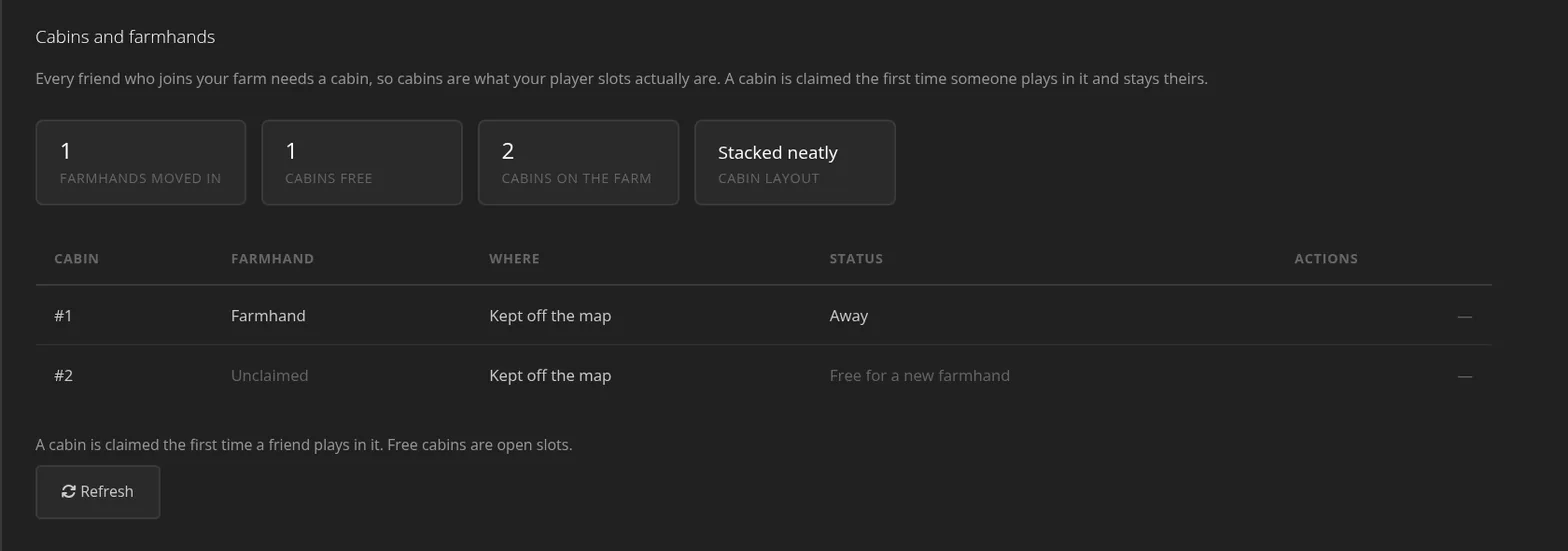
The server also builds a replacement cabin as soon as the last free one is taken. There is always a seat waiting for the next person. Plans start at four slots and go up from there, and moving up does not touch the world.
The farm on a screen
The live map is the part people open first. It reads the running game rather than a save file on disk. Crops carry their real growth stage, and watered soil is a different color from dry. Machines say what they are making and when it will be done, and animals appear by name with their species underneath.
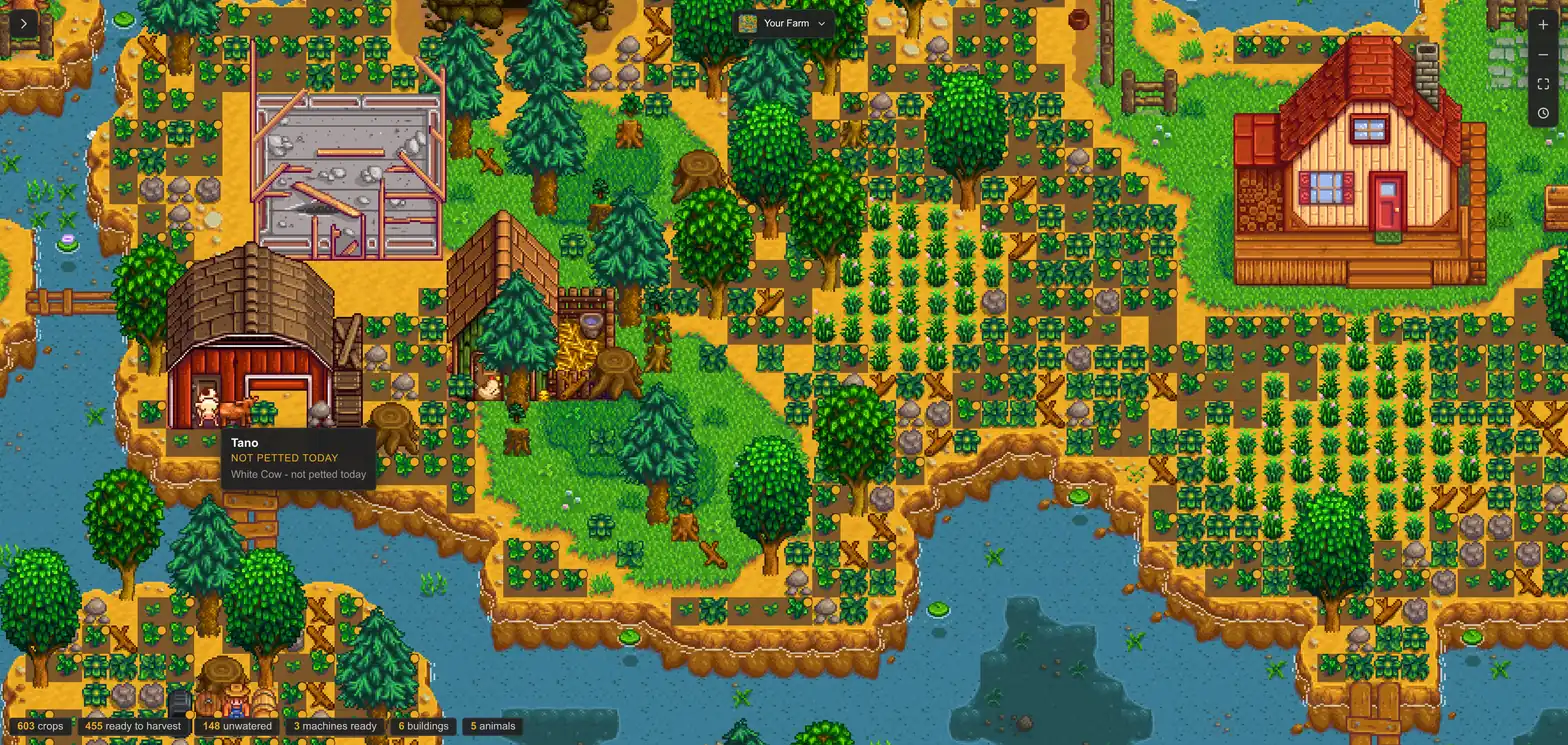
Layers toggle one at a time, and one of them highlights everything ready to collect. On a field of 600 crops that is the difference between a picture and a wall of pixels. Farmers show up as named markers at their true positions while they play.
The Almanac is the other half, and it is the tab that changes how you play the season. It carries today's and tomorrow's weather, the day's luck and how many days are left in the season. A crop table shows what is ready now and what dies at the season change. Villager birthdays sit on the same page.
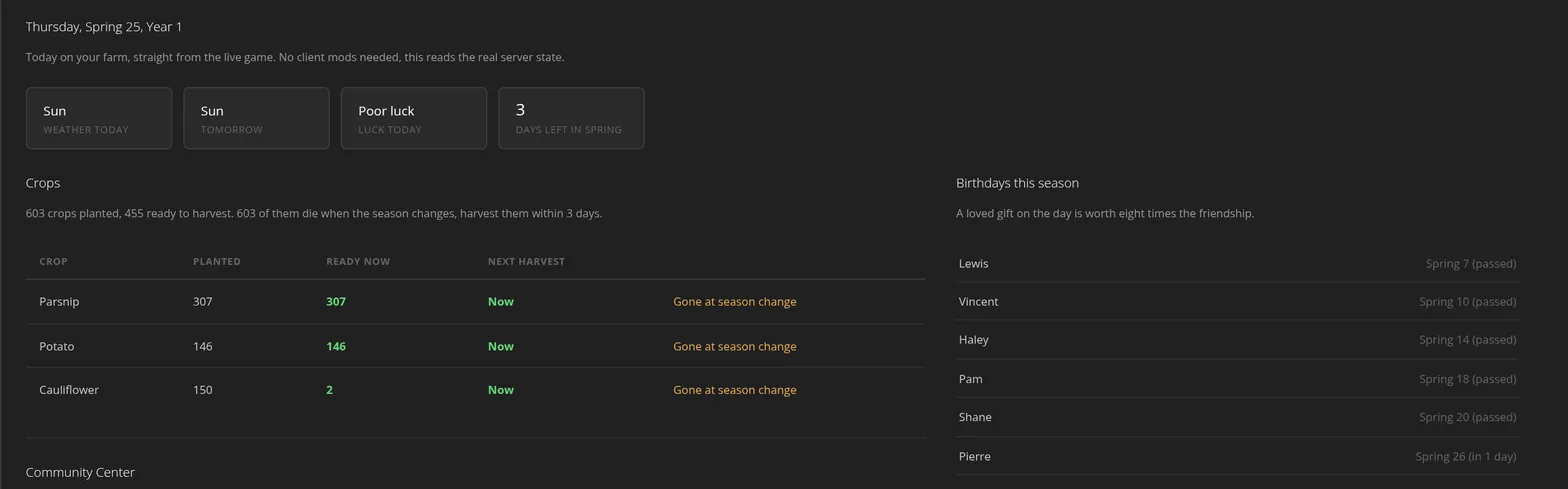
We checked those numbers against the save with an independent parser rather than trusting our own code twice. Across 736 crops there were no mismatches, down to the per-type ready counts and the Community Center bundle requirements.
The remaining tabs cover the rest of the job:
- A browser console that streams the live log and runs the commands you allow.
- An activity ledger with per-farmhand playtime and last-seen.
- Alerts, with optional Discord webhooks.
- Kick and ban, without joining the game.
- A share link that publishes a read-only copy of the map to anyone, no panel account needed.
Mods, and who has to install what
The mod picker is built into the panel and installs on the server for you. Pick what you want, save and restart, and the server downloads each mod, verifies it, and lets SMAPI load it at boot. You can select up to 25 at a time.
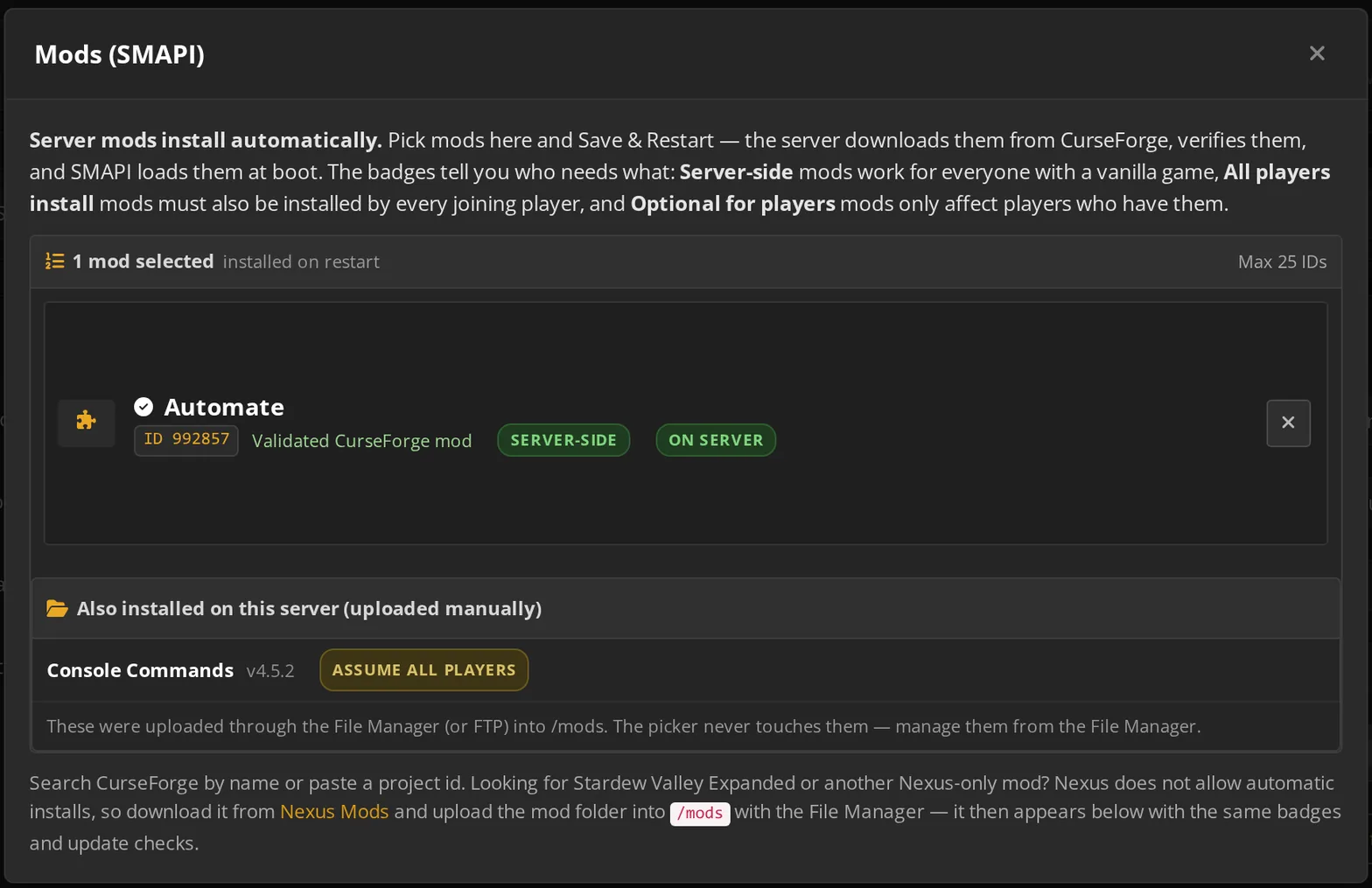
The badge on each mod is the part that prevents arguments:
- Server-side means everyone can keep a vanilla game.
- All players install means every joining player needs it too.
- Optional for players means it only affects whoever has it.
Mods that exist only on Nexus are still usable. You upload those yourself through the file manager, and they appear in the same list with the same badges and update checks.
What we learned by actually playing on it
Two things came out of a real play session that no amount of log reading would have found.
The first was a defect, and an embarrassing one. A farmhand joining a completely empty farm spawned in bed and could not move. The world auto-pauses when nobody is on it, and a paused world never processes movement.
Since a joiner hits an empty farm almost every time, that was most people's first impression of the product. Pelican now releases the pause the moment a peer connects.
The second was reassuring. We harvested a parsnip in game and watched it vanish from the map on the next poll. Then we walked into bed at 11:50pm and the day rolled over, with the client still connected and the save written cleanly.
The map is not decoration painted over a save file. It is the running game.
The save-rescue tool came out of the same work. Uploading an existing farm normally costs the person who started it their farmer, because the save's host slot becomes the server. Ours moves that farmer into a cabin with their skills, their house and their belongings intact, so the original owner keeps playing as themselves.
What this means for your farm
If you have been taking turns hosting, this removes the turn. The farm is up when your friends are up, in whichever of our datacenter locations is closest to them. Nobody has to leave a laptop running to keep a season moving.
Back up before you swap a world. Not because the server is fragile, but because a world swap is the one operation where a mistake has no undo and a copy costs nothing.
If you want to build one yourself, the Stardew server setup guide covers it from an empty farm onward. Our hosted Stardew Valley farms deploy in a couple of minutes with Pelican Command already switched on, and the rest of the games we host is one click from there.
 Written by , CEO at Survival Servers
Staff ← All news
Written by , CEO at Survival Servers
Staff ← All news
 Delverium
 Dimraeth
 Red Dead Redemption 2 (RDR2): RedM
Comments
No comments yet. If you run one of these servers, what did you hit?