
Motor Town: Behind The Wheel Server Hosting


Our own control panel
Upload vehicle mods, switch locations, and change any setting from your control panel.


Watch the Motor Town Trailer
Motor Town: Behind The Wheel is an open-world driving life sim from P3 Games. Drive, deliver and build a career across a recreation of Jeju Island: haul freight, run bus and taxi routes, patrol as police, race rallies and grow a company in a persistent player economy, alone or with friends.
Your Server on a Live Map
Every Motor Town server includes our live map: a real relief map of the island we measured ourselves, with live players, deliveries and the island economy on top.
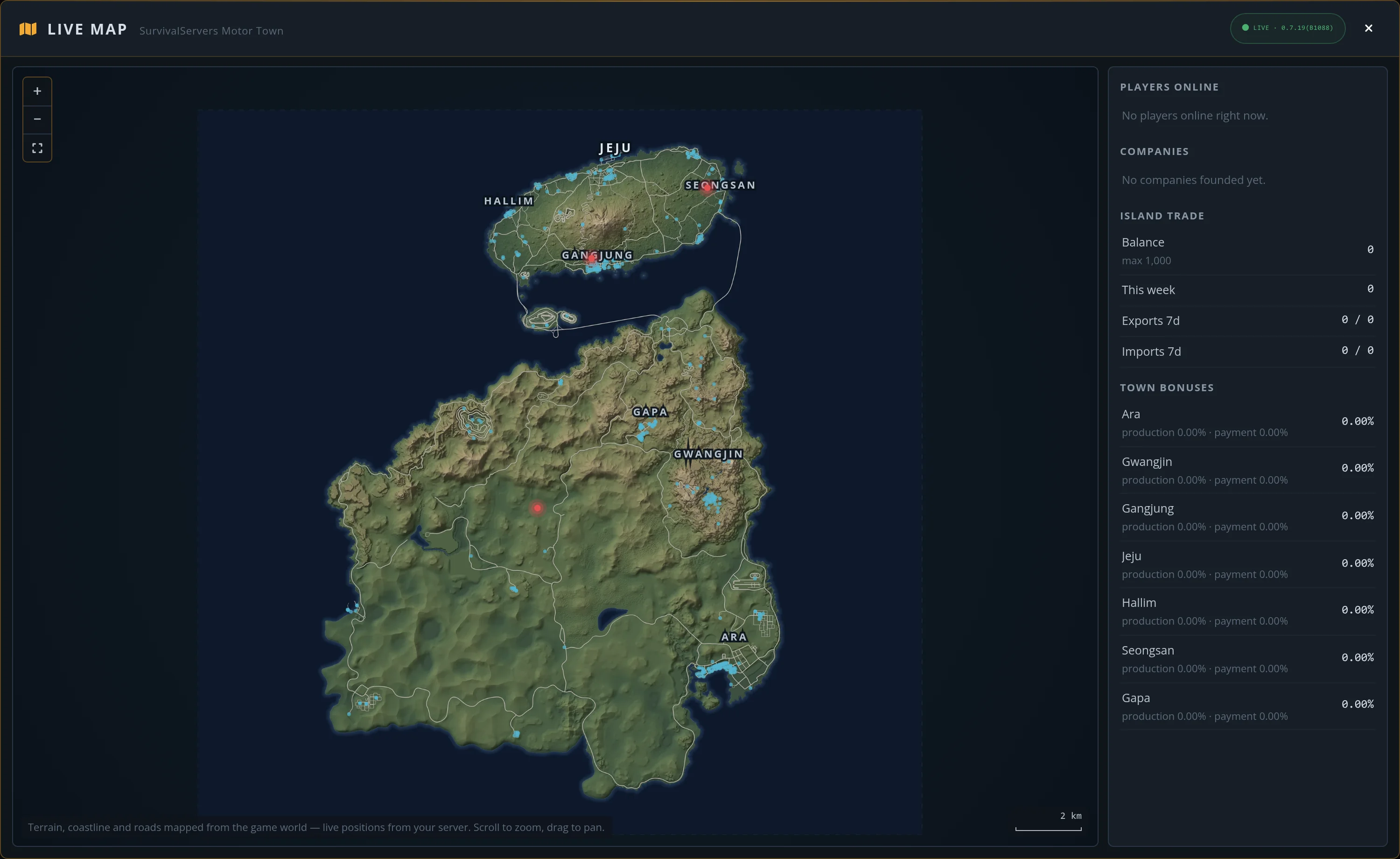
Measured Terrain
We measured the relief, coastline and every road from a live server and drew them to road-level accuracy.
Live Players
See who's online and where they're driving, with their current vehicle and AFK status, updated live.
Island Economy
See delivery sites, the island trade balance, exports, imports, companies and town production bonuses at a glance.
Zero Setup
It's in the control panel on every server, with no mods or companion apps to install.
Server locations
Switch any time. DDoS protection included.
How to Create a Motor Town Server: Setup Guide
Here's how to set up a Motor Town: Behind The Wheel dedicated server, the fast way with Survival Servers or the DIY way on your own PC.
Your server is online in four steps:
- Click Order Now above
- Enter a username, password and email, or sign up with Google, Twitch or Discord
- Pick your slots, billing cycle and location
- Click "Order Now" and your server is online in minutes, with full control panel access
Without Survival Servers
Running your own Motor Town server takes more setup:
System Requirements
- A Windows machine (the Motor Town dedicated server is Windows-only)
- At least 2 CPU cores and 2 GB of RAM for a small server, plus about 5 GB of disk space and room for saves and vehicle mods
- A PC you can leave on whenever anyone wants to play
- A stable connection with the game port forwarded (default
7777TCP/UDP, plus27015for Steam queries) - SteamCMD, or the Steam client, for installs
Installation
- Install the Motor Town: Behind The Wheel Dedicated Server from Steam (App ID
2223650). The server tool is granted with the game, so the installing account must own Motor Town. SteamCMD's anonymous login won't work here. - Run the server once, then stop it. It generates
DedicatedServerConfig_Sample.jsonin the server folder. Copy that toDedicatedServerConfig.jsonand edit it: server name, welcome message, password, max players, player vehicle limits, housing rental rules and NPC traffic density all live in this one file. - Add your admins to the config by SteamID64 so they can kick, ban and send announcements in-game.
- Forward TCP/UDP
7777(game) and27015(Steam query) to the host machine, and add matching firewall rules. Enable the web API in the config (its own TCP port) if you want browser-based admin tools. - World saves live under the server's
Saved\SaveGamesfolder. Back those up yourself on a schedule. - Share your public IP and port with players, or have them find your server in the in-game server browser.
Mods
- Motor Town supports vehicle mods packaged as
.pakfiles, with a large library shared on Nexus Mods. Install them on the server and enable modded vehicles in the config. - Every player who wants to see a modded vehicle needs the same mod installed, so keeping a modded server in step with its players is work you take on yourself.
Why Wait? Use Survival Servers Instead
- Online in minutes on SSD drives, with DDoS protection in all 8 locations
- Change the server config, upload vehicle mods and set gameplay rules from your control panel
- Web admin tools built in: kick or ban players, manage roles, and send announcements without launching the game
- You get automatic restarts, scheduled backups and full FTP access from day one
- Update from the control panel, or turn on Server Update (Automatic) and new versions install for you
- You skip SteamCMD, port forwarding, firewall rules and Windows updates
Motor Town Dedicated Server vs Self-Hosting
Every Motor Town owner can run the dedicated server on their own PC, but the world only runs while that PC is on, and your home connection carries all the traffic. A hosted server keeps your group's companies, deliveries and owned vehicles waiting for whoever logs in next.
Motor Town Settings, Saves and Sizing
Configuration
Set the server name, welcome message, server password, vehicle limits, housing rental rules and NPC traffic density from the control panel, or edit DedicatedServerConfig.json over FTP if you prefer.
Admin Tools
Kick, ban or mute players, give admin and police roles and message everyone from the Live Map, without launching the game.
Sizing
Plans run from 10 to 40 slots, from a few friends to a busy community. NPC traffic density and player vehicle counts drive most of the load.
Location
Pick the location closest to your group. Lower ping keeps convoys, races and police chases tight.
From the Survival Servers Wiki
Motor Town: Behind The Wheel Guides & Tutorials
Frequently Asked Questions about Motor Town Server Hosting
Up to 40 on our plans, which come with 10, 20 or 40 slots. Start small with friends and move up a plan later without losing your world.
Yes. P3 Games ships an official dedicated server on Steam that comes with the game, set up through one JSON file and with a web admin API for kicks, bans and announcements. We run that same server, with a settings editor and admin tools in the control panel.
Yes. Upload vehicle mods (.pak files, many on Nexus Mods) with the File Manager and turn on Modded Vehicles in the control panel. Players who install the same mods can drive those vehicles on your server.
No. The official dedicated server only runs on Windows, so hosting it yourself means a Windows PC left on for it. Every Motor Town server here runs on Windows for you, and you update the game from the control panel.
Yes. With the server stopped, upload your save files from %LOCALAPPDATA%\MotorTown\Saved\SaveGames on your PC into MotorTown\Saved\SaveGames using the File Manager, then start the server. Only the first character slot's world transfers cleanly, so check that slot before you copy.
Put your SteamID64 in the Admin Steam IDs field of Server Config in your control panel, then restart to unlock the in-game admin menu. You can also kick, ban, message everyone and manage police roles from the Live Map without joining the game.
We host Motor Town servers in 8 locations: Los Angeles, Seattle, Dallas, New York and Miami in the US, Germany and France in Europe, and Singapore in Asia. Pick the one closest to your community for the lowest ping on Jeju Island's roads.
No. Motor Town: Behind The Wheel has been in Early Access on Steam since December 2021, and it's fully playable today.
Motor Town: Behind The Wheel is an open-world driving life sim from P3 Games set on a recreation of Jeju Island. You earn your way through trucking, bus and taxi routes, police patrols, rally races and towing jobs, buying and upgrading vehicles and building companies in a persistent player economy.