

http://www.armaholic.com/page.php?id=26093
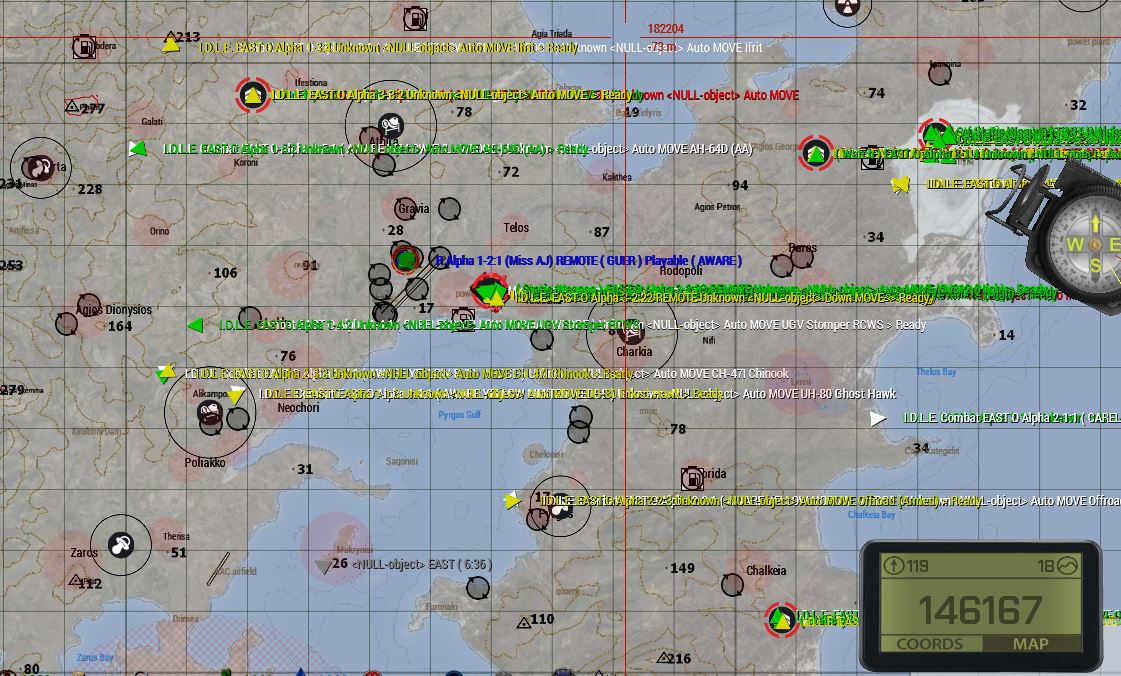
The link above is a script that greatly improves FPS on the Server, and Client side. The issue I'm having (well not an issue just something that annoys me) is with this script enabled - You now have the icons on the map that show Idle units, ect. ect. with very very long names it is rather distracting.
I am looking for a way to not show them on the map but keep the script intact and working.
See attached picture to see what kind of mess this script makes.


From a quick glance, assuming you are using the script based version of this mod you will want to change the default call line in the init.sqf.
Change if (isServer) then {[1000,-1,true,100,1000,1000]execvm "zbe_cache\main.sqf"}; to if (isServer) then {[1000,-1,false,100,1000,1000]execvm "zbe_cache\main.sqf"};
By default it appears the developer leaves debug on, by disabling debug you should stop seeing all of those markers on the map! Simply put change true to false!
I did that and it stills shows up
[] execVM "addons\statusBar\statusBar.sqf";
execVM "R3F_LOG\init.sqf";
#include "A3XAI_Client\A3XAI_initclient.sqf";
if (isServer) then {[1000,-1,false,100,1000,1000]execvm "zbe_cache\main.sqf"};