
Unturned Custom Maps and Mods
Add custom maps and mods to your Unturned server in the Command Center. On the Game Server page, click Browse next to Workshop Files, click Add Mod on each one, then click Save Settings & Restart. A map also needs its name on the map line of Commands.dat, as in steps 4 and 5 under Maps. To upload them yourself instead, you need FTP. How to connect: FTP Access.
Downloading Workshop mods
- In Steam, click the Community tab and choose Workshop.
- On the next screen, type "Unturned" in the search box and select it when it appears.
- On the next screen, check the box labeled Map (for mods, you don't need to check it).
- When you find a mod or map you like, click the Subscribe button. Steam starts downloading it to your library.


Once you've downloaded all the Workshop mods for your Unturned server, upload them to your server over FTP.
Uploading maps and mods
Uploading maps and mods to your Unturned server works the same way, except for where the files go and how you set the new map.
Maps
- Find the map files in your Steam folder. By default, they're here:
- C:\Program Files (x86)\Steam\steamapps\workshop\content\304930\MAP_ID_VALUE
- 304930 is the application ID for Unturned
- The MAP_ID_VALUE is at the end of the mod's URL on the Steam Workshop.
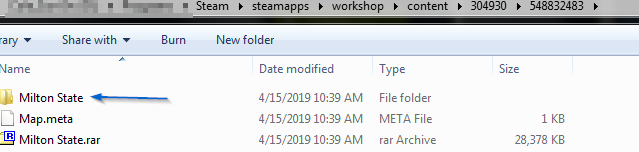
- C:\Program Files (x86)\Steam\steamapps\workshop\content\304930\MAP_ID_VALUE
- Over FTP, open the /Servers/Server/Workshop/Maps folder on your server.
- Upload the map from your computer to that folder.
- Go to /Servers/Server/Server/ and open the Commands.dat file.
- Change the Map value to the map's folder name.


After this, use the Start, Stop or Restart buttons in the Command Center, because the Save Settings & Restart button overwrites your changes to this file.
Mods
Mods install like maps, except they go in a different folder and you skip steps 4 and 5 of Maps.
- Go to the /Servers/Server/Workshop/Content folder.
- Upload the mod folders from your computer to that folder on your server.
When your files are in the right folders, close your FTP program and start your server from the Command Center.
Unturned server hosting from Survival Servers comes with instant setup and DDoS protection.