
ARK: Transfer Singleplayer To Multiplayer
What you'll need
- An FTP program (FileZilla) and access to your server. How to connect: FTP Access.
- Your 17-digit Steam ID (it starts with 7656).
- Go to steamid.io.
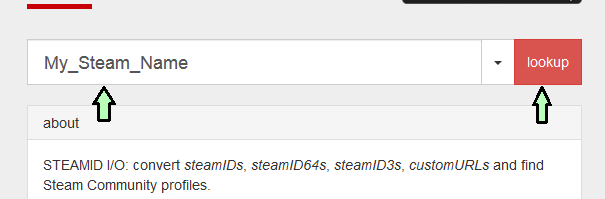
Type your Steam name to see a list of values. Copy the steamID64 value into Notepad.
- Go to steamid.io.
- Your save files, found on your PC at C:\Program Files (x86)\Steam\steamapps\common\ARK\ShooterGame\Saved\SavedArksLocal (default path).
- xxxxx.arktribe: your ARK tribe's data, such as building permissions and tamed dino permissions.
- LocalPlayer.arkprofile: your character's data, such as the engrams you've learned and how you spent your skill points.
- TheIsland.ark, Aberration_P.ark, Ragnarok.ark and so on: the saved world map, with your buildings, where they stand, your dinos and more.

Transfer process
- Stop your server in the Command Center.
- Connect to your server with your FTP program and go to /ShooterGame/Saved/SavedArkXXX/, where XXX is the game server's ID. Paste all 3 files into this folder.
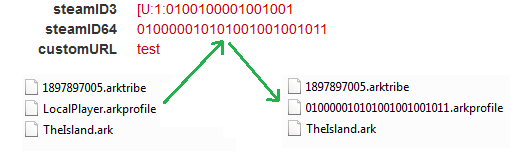
- In your FTP folder, rename LocalPlayer.arkprofile to YYY.arkprofile, where YYY is your Steam ID. This links the survivor profile to your Steam account.
- Start your server.

Once the server is up, join with your singleplayer survivor. All your dino and world data will be there. If you have any problems, open a ticket with our support desk.
Rent an ARK: Survival Evolved server from Survival Servers with instant setup.