
Project Zomboid Server Configuration: Difference between revisions
Jump to navigation
Jump to search
[wiki:ss-claude-11372] Fixes: wrong or outdated steps, labels and facts corrected, current pictures, dead links fixed, search title and description |
[wiki:wiki-operator] Server Config now keeps FTP changes; says when a save still writes over them (Ryan yes 10/27) |
||
| Line 5: | Line 5: | ||
==Changing Settings== | ==Changing Settings== | ||
Server settings can be changed using [[FTP_Access | FTP]] or using the Admin panel. | Server settings can be changed using [[FTP_Access | FTP]] or using the Admin panel. | ||
You can also use '''Server Config''' under '''TOOLS'''. | You can also use '''Server Config''' under '''TOOLS'''. It keeps changes made over FTP. A save made there while the server runs is written at its next start, over any FTP change made in between. | ||
===FTP=== | ===FTP=== | ||
#After logging in using FTP, navigate to '''\Server'''. | #After logging in using FTP, navigate to '''\Server'''. | ||
Revision as of 20:25, 27 October 2026
Changing Settings
Server settings can be changed using FTP or using the Admin panel. You can also use Server Config under TOOLS. It keeps changes made over FTP. A save made there while the server runs is written at its next start, over any FTP change made in between.
FTP
- After logging in using FTP, navigate to \Server.
- By default, you will find two files with the extensions MyWorld.ini and MyWorld_SandboxVars.lua.
- The setting/settings you are looking to change will determine which file to open.
- The .ini file will be general server settings, while the .lua will be your sandbox settings.
- After your changes are made, save the file and restart the server if needed.
Admin Panel
- Grant yourself admin using /setaccesslevel "username" admin in chat.
"By default, the server owner can gain admin rights by logging in to their server using the username "admin" and their RCON password, which is the RCON Pass in their Command Center." - Pressing "Esc" on your keyboard will open up a menu and the Admin Panel can then be selected.
Custom Spawn Points
Spawn points can be forced per coordinates or given as a choice per region.
Coordinates
- Using FTP, open MyWorld.ini by default in \Server and change SpawnPoint=0,0,0 to the coordinates where you want all players to spawn.
"Coordinates can be located on the Project Zomboid map"
Regions
- Using FTP, open MyWorld_spawnregions.lua in \Server.
- If the file does not exist, you can create the file. An example file can be found on Google Drive.
Example: the four towns the game lists by default.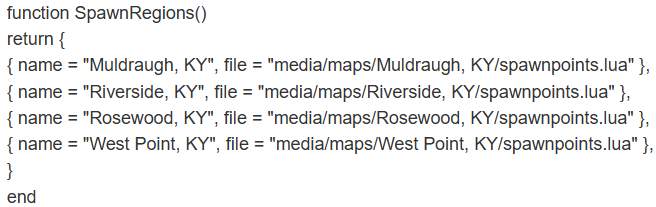
- On Build 41, be sure SpawnRegions=MyWorld_spawnregions.lua is set in the MyWorld.ini. Build 42's MyWorld.ini has no such line.
- You would remove or add the regions you would like to have as options for players to spawn at.
"Custom maps from mods can also be added after being added properly" ->Adding Mods.

Don't have a server yet? Rent a Project Zomboid server from Survival Servers and be online in minutes.