
ARK: Transfer Singleplayer To Multiplayer: Difference between revisions
Jump to navigation
Jump to search
No edit summary |
[wiki:ss-claude-11372] Cut filler: notes about the page itself, repeated lines, empty phrases and decorative pictures (Ryan 2026-10-15) |
||
| (4 intermediate revisions by 2 users not shown) | |||
| Line 1: | Line 1: | ||
{{#seo: | |||
|title=ARK Singleplayer to Multiplayer: Move Your Save to a Server | |||
|description=Move your ARK: Survival Evolved singleplayer world, character and tames to a server: which files to upload, where they go and how to rename your profile. | |||
}} | |||
== What You Will Need == | == What You Will Need == | ||
# FTP Program and Access. See [[FTP_Access|FTP Access]] for more help. | # FTP Program and Access. See [[FTP_Access|FTP Access]] for more help. | ||
# Your Steam64 ID for your Steam account. | # Your Steam64 ID for your Steam account. | ||
#* Go to | #* Go to [https://steamid.io/ steamid.io].<br />[[File:SteamID.IO.png|alt=The steamid.io lookup box with a Steam name typed in and green arrows pointing at the box and the lookup button.]]<br />Type in your Steam name and it will display a list of values. Copy the Steam64 value in a notepad.<br /><br /> | ||
# Your saved data, found on your computer at C:\Program Files (x86)\Steam\steamapps\common\ARK\ShooterGame\Saved\SavedArksLocal (default path). | # Your saved data, found on your computer at C:\Program Files (x86)\Steam\steamapps\common\ARK\ShooterGame\Saved\SavedArksLocal (default path). | ||
#* xxxxx.arktribe - This is the data for your ARK tribe. This includes data such as building permissions and tamed dino data permissions. | #* xxxxx.arktribe - This is the data for your ARK tribe. This includes data such as building permissions and tamed dino data permissions. | ||
| Line 13: | Line 15: | ||
== Transfer Process == | == Transfer Process == | ||
# Stop your server | # Stop your server in the Command Center. | ||
# Using your FTP program of choice, connect to your server and go to /ShooterGame/Saved/SavedArkXXX/, where XXX is the game server's ID. Past all 3 files in this directory. | # Using your FTP program of choice, connect to your server and go to /ShooterGame/Saved/SavedArkXXX/, where XXX is the game server's ID. Past all 3 files in this directory. | ||
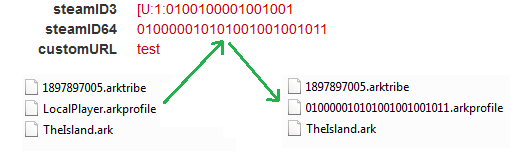
# In your FTP folder, rename LocalPlayer.arkprofile to YYY.arkprofile, where YYY is your Steam64 ID. This associates the survivor profile with your Steam account.<br><br>[[File:SingleplayerTransfer1.png]]<br> | # In your FTP folder, rename LocalPlayer.arkprofile to YYY.arkprofile, where YYY is your Steam64 ID. This associates the survivor profile with your Steam account.<br><br>[[File:SingleplayerTransfer1.png|alt=Diagram of LocalPlayer.arkprofile being renamed to the steamID64 number shown on steamid.io, next to the arktribe and TheIsland.ark files.]]<br> | ||
# Start your server. | # Start your server. | ||
Once the server starts up, you should be able to join with your singleplayer survivor and all of the dino and world data will be available. If you encounter any issues, please submit a ticket to our support desk. | |||
You can [https://www.survivalservers.com/services/game_servers/ark_survival_evolved/ host your own ARK: Survival Evolved server] with Survival Servers with instant setup. | |||
Latest revision as of 13:35, 15 October 2026
What You Will Need
- FTP Program and Access. See FTP Access for more help.
- Your Steam64 ID for your Steam account.
- Go to steamid.io.
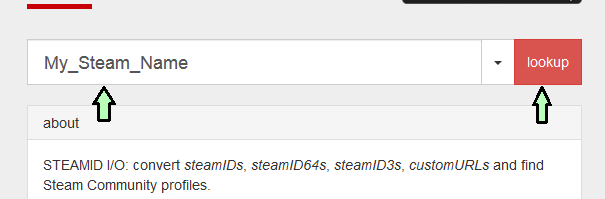
Type in your Steam name and it will display a list of values. Copy the Steam64 value in a notepad.
- Go to steamid.io.
- Your saved data, found on your computer at C:\Program Files (x86)\Steam\steamapps\common\ARK\ShooterGame\Saved\SavedArksLocal (default path).
- xxxxx.arktribe - This is the data for your ARK tribe. This includes data such as building permissions and tamed dino data permissions.
- LocalPlayer.arkprofile - This is the specific data for your character. This includes what engrams you've learned, your skill point allocation, etc.
- TheIsland.ark, Aberration_P.ark, Ragnarok.ark, etc. - This is the saved world map for your server. This includes building data and location, dino data, etc.

Transfer Process
- Stop your server in the Command Center.
- Using your FTP program of choice, connect to your server and go to /ShooterGame/Saved/SavedArkXXX/, where XXX is the game server's ID. Past all 3 files in this directory.
- In your FTP folder, rename LocalPlayer.arkprofile to YYY.arkprofile, where YYY is your Steam64 ID. This associates the survivor profile with your Steam account.
- Start your server.

Once the server starts up, you should be able to join with your singleplayer survivor and all of the dino and world data will be available. If you encounter any issues, please submit a ticket to our support desk.
You can host your own ARK: Survival Evolved server with Survival Servers with instant setup.