Conan Exiles Server Configuration: Difference between revisions
Jump to navigation
Jump to search
(Created page with "== Custom Maps == #In your control panel, select '''Custom''' in the map type drop down. #Insert the map mod id in the '''Mod ID(s)''' box. #In the custom launch parameters, t...") |
|||
| (3 intermediate revisions by the same user not shown) | |||
| Line 1: | Line 1: | ||
== Custom Maps == | == Custom Maps == | ||
Custom maps can be configured from within your control panel.<br> | |||
#In your control panel, select '''Custom''' in the map type drop down. | #In your control panel, select '''Custom''' in the map type drop down. | ||
#Insert the map mod id in the '''Mod ID(s)''' box. | #Insert the map mod id in the '''Mod ID(s)''' box. | ||
#In the | #In the '''Custom Launch Parameters''', the map must be selected to load.<br> Example: '''Savage Wilds'''.<br> [[File:Savage_Wilds.png]] | ||
#Click the large green button at the bottom of your control panel to apply the changes and restart your server. | #Click the large green button at the bottom of your control panel to apply the changes and restart your server. | ||
Latest revision as of 09:52, 29 July 2021
Custom Maps
Custom maps can be configured from within your control panel.
- In your control panel, select Custom in the map type drop down.
- Insert the map mod id in the Mod ID(s) box.
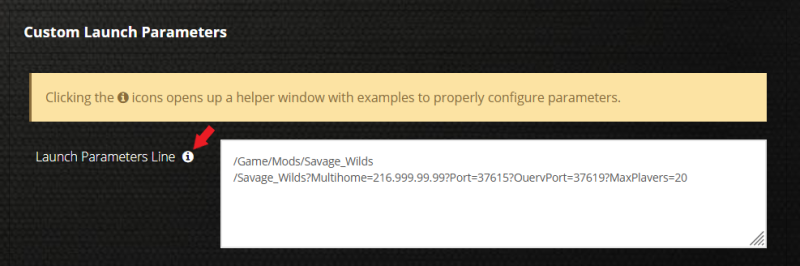
- In the Custom Launch Parameters, the map must be selected to load.
Example: Savage Wilds.
- Click the large green button at the bottom of your control panel to apply the changes and restart your server.
